> ## Documentation Index
> Fetch the complete documentation index at: https://docs.stigg.io/llms.txt
> Use this file to discover all available pages before exploring further.

# Credits balance

## Overview

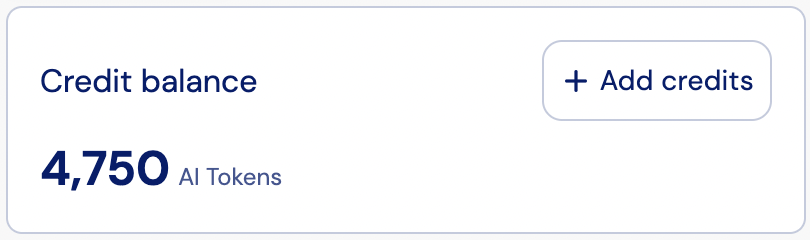
The **Credits Balance widget** displays a customer’s current prepaid credit balance. It provides visibility into how many credits remain in the account, and includes an **Add credits** call-to-action button for prompting customers to top up their balance.

## Layout

The Credit balance widget displays the customer’s current available credit amount in a clear and prominent format.

The layout includes the following elements:

* The customer’s current credit balance in tokens (or other configured unit).
* The balance updates in real time after purchases or top-ups.
* An **Add credits** CTA button for prompting customers to top up their balance.

<img src="https://mintcdn.com/stigg/R8ldx2GNXX1cZgjS/images/credit-balance.png?fit=max&auto=format&n=R8ldx2GNXX1cZgjS&q=85&s=0e4a35e59c196e407c25741b706246ef" alt="" width="810" height="240" data-path="images/credit-balance.png" />

## Add credits

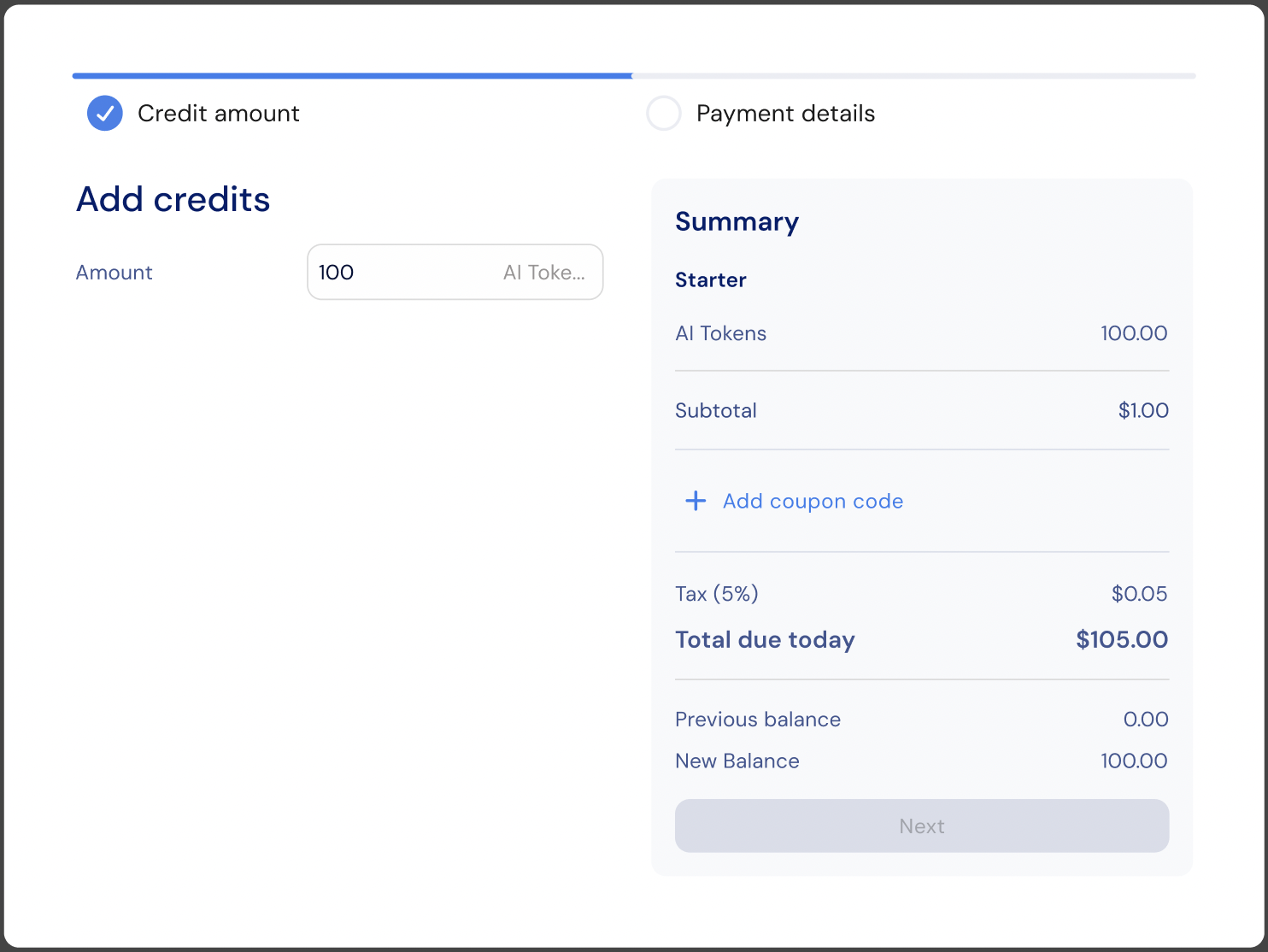
The **Add credits** button is shown automatically when both of the following conditions are met:

* Credit top-ups are allowed for the customer's account.
* The customer's current plan includes add-ons that can grant additional credits.

When clicked, Stigg opens a checkout flow that allows the customer to purchase additional credits. The credit amount and pricing are determined by the billing model configured in the top-up add-on within the price wizard.
<img src="https://mintcdn.com/stigg/AQ59lzd1Y-8XWZuQ/images/add-credits-checkout.png?fit=max&auto=format&n=AQ59lzd1Y-8XWZuQ&q=85&s=ee1bbf1293bc46ca3a6c783d13d15737" alt="" width="1484" height="1114" data-path="images/add-credits-checkout.png" />

Use the `onAddCredits` prop to hook into the button click, for example to open a custom modal, trigger analytics, or redirect to a dedicated top-up page:

```jsx theme={null}
<CreditBalance
  currencyId="cred-type-ai-tokens"
  onAddCredits={() => {
    // Custom behavior when "Add credits" is clicked
  }}
/>
```

## Customization

### No-code widget designer

The Stigg app offers a no-code widget designer, which allows you to control the widget colors, typography and layout.

### Custom CSS

For more advanced customization, custom CSS can be applied using the widget designer of the Stigg app. Alternatively, custom CSS can also be applied using code.

Below you can find a list of the supported CSS classes:

#### Main container classes

| Class name                                                                   | Description                                                   |
| ---------------------------------------------------------------------------- | ------------------------------------------------------------- |
| <span style={{whiteSpace: "nowrap"}}>`stigg-credit-balance-container`</span> | Main wrapper container for the entire `CreditBalance` widget  |
| <span style={{whiteSpace: "nowrap"}}>`stigg-credit-balance-card`</span>      | Card container with border and padding that wraps the content |

#### Content classes

| Class name                                                                          | Description                                     |
| ----------------------------------------------------------------------------------- | ----------------------------------------------- |
| <span style={{whiteSpace: "nowrap"}}>`stigg-credit-balance-title`</span>            | Title/header text at the top of the widget      |
| <span style={{whiteSpace: "nowrap"}}>`stigg-credit-balance-value-amount`</span>     | Main balance amount (large number)              |
| <span style={{whiteSpace: "nowrap"}}>`stigg-credit-balance-value-suffix`</span>     | Units or symbol text next to the amount         |
| <span style={{whiteSpace: "nowrap"}}>`stigg-credit-balance-value-error`</span>      | Error message when balance fails to load        |
| <span style={{whiteSpace: "nowrap"}}>`stigg-credit-balance-value-loading`</span>    | Loading skeleton state                          |
| <span style={{whiteSpace: "nowrap"}}>`stigg-credit-balance-value-no-balance`</span> | Message shown when no balance data is available |

#### CTA button classes

| Class name                                                                            | Description                            |
| ------------------------------------------------------------------------------------- | -------------------------------------- |
| <span style={{whiteSpace: "nowrap"}}>`stigg-credit-balance-add-credits-button`</span> | **Add credits** CTA button             |
| <span style={{whiteSpace: "nowrap"}}>`stigg-credit-balance-add-credits-icon`</span>   | Icon inside the **Add credits** button |

## Snippet

```jsx theme={null}
import { StiggProvider, CreditBalance } from '@stigg/react-sdk';

function App() {
  return (
    <StiggProvider
      apiKey="your-stigg-api-key"
      customerId="customer-demo-01"
    >
      <div className="credit-widgets">
        {/* Basic Credit Balance */}
        <CreditBalance
          currencyId="cred-type-ai-tokens" // Required: currency identifier
          showUnits={true} // Optional: show units text
          decimalPlaces={2} // Optional: limit decimal places (null = no limit)
          localization={{
            title: "Available Credits" // Optional: custom title
          }}
          onAddCredits={() => {
            // Optional: callback invoked when the "Add credits" button is clicked
            // The button is displayed when top-ups are allowed and
            // the plan has add-ons that can grant additional credits
          }}
        />
      </div>
    </StiggProvider>
  );
}

export default App;
```

### Props

<ParamField body="currencyId" type="string" required>
  Currency or credit type identifier used to fetch the credit balance.
</ParamField>

<ParamField body="decimalPlaces" type="number">
  Number of decimal places to display for the balance value. Defaults to no limit when not set.
</ParamField>

<ParamField body="showUnits" type="boolean">
  Whether to display the currency unit label (for example, `"tokens"` or `"credits"`).
</ParamField>

<ParamField body="onAddCredits" type="(entitlement: CreditEntitlement) => void">
  Callback invoked when the **Add credits** button is clicked. Receives the current `CreditEntitlement` object. Use this to open a checkout flow, a modal, or redirect the customer to a top-up page.
</ParamField>

<ParamField body="localization" type="object">
  Text overrides for customizing widget labels, messages, and states.
</ParamField>

<ParamField body="className" type="string">
  Additional CSS class applied to the root container.
</ParamField>

## Related SDKs

<CardGroup cols={2}>
  <Card title="" href="/api-and-sdks/integration/frontend/react" horizontal>
    <div style={{ display: 'flex', alignItems: 'center', gap: '12px' }}>
      <img src="https://mintcdn.com/stigg/FZ_ywutvYHnQbKpn/images/react.svg?fit=max&auto=format&n=FZ_ywutvYHnQbKpn&q=85&s=75e8661a7d87b8e2b3493d7fdfb33db9" alt="React" style={{ width: '32px' }} width="23" height="20" data-path="images/react.svg" />

      <span>React</span>
    </div>
  </Card>

  <Card title="" href="/api-and-sdks/integration/frontend/vuejs" horizontal>
    <div style={{ display: 'flex', alignItems: 'center', gap: '12px' }}>
      <img src="https://mintcdn.com/stigg/qpsRT7dNo0hXTxnb/images/vue.svg?fit=max&auto=format&n=qpsRT7dNo0hXTxnb&q=85&s=c861442fd84f9822a716d778b10a8dba" alt="Vue.js" style={{ width: '32px' }} width="800" height="800" data-path="images/vue.svg" />

      <span>Vue.js</span>
    </div>
  </Card>

  <Card title="" href="/api-and-sdks/integration/frontend/nextjs" horizontal>
    <div style={{ display: 'flex', alignItems: 'center', gap: '12px' }}>
      <img src="https://mintcdn.com/stigg/FZ_ywutvYHnQbKpn/images/next.svg?fit=max&auto=format&n=FZ_ywutvYHnQbKpn&q=85&s=7fea95b3e8f678015cb8b8d58d1e7886" alt="Next.js" style={{ width: '32px' }} width="16" height="16" data-path="images/next.svg" />

      <span>Next.js</span>
    </div>
  </Card>

  <Card title="" href="/api-and-sdks/integration/frontend/html" horizontal>
    <div style={{ display: 'flex', alignItems: 'center', gap: '12px' }}>
      <img src="https://mintcdn.com/stigg/aJeGPh9dwMpK_Kcr/images/html.svg?fit=max&auto=format&n=aJeGPh9dwMpK_Kcr&q=85&s=ae948dc9e5ca66cf75892b94859954a0" alt="Webflow, Wordpress, HTML" style={{ width: '32px' }} width="800" height="800" data-path="images/html.svg" />

      <span>Webflow, Wordpress, HTML</span>
    </div>
  </Card>
</CardGroup>
