

Overview
Importing your existing data into Stigg is a key milestone in the integration process. This guide will walk you through the process step-by-step, ensuring a smooth transition and uninterrupted operations.Entities that can be imported
- Customers
- Subscriptions
- Usage data

Prerequisites
- Your pricing has been modeled in Stigg.
- NodeJS must be installed.
- Obtain the full access key of the environment that you’d like to import the data to.
- Export the above full access key as an environment variable:
Importing customers
Using the CLI
Create a file calledcustomers.json that contains all the customers that will be imported to the environment.
The file should be in the following schema:
Using the API and SDKs
Using theimportCustomerBulk endpoint.
The
importCustomerBulk endpoint supports up to 1,000 customers per request and has a rate limit of 250 requests per minute.Importing subscriptions
Free plans
Using the CLI
To migrate subscriptions to free plans, create a file calledfree-subscriptions.json that contains all of the subscriptions that should be imported.
The file should be in the following schema:
Using the API and SDKs
Using theimportSubscriptionsBulk mutation.
Paid plans
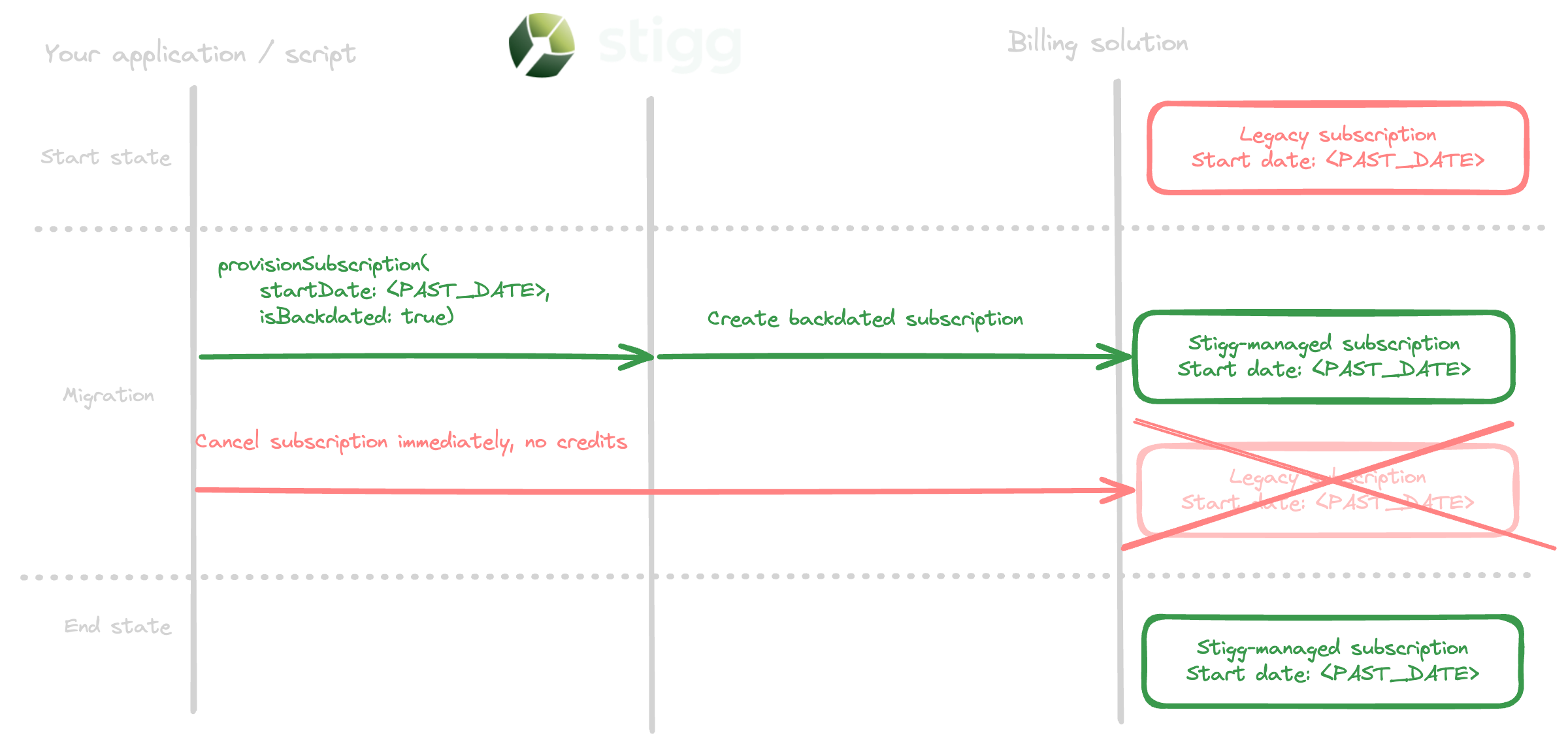
To migrate subscriptions to paid plans, repeat the below process for each subscription:- Provision a subscription in Stigg with the start date of the subscription that currently exists in your billing provider and include the
billingInformation.isBackdated: trueproperty. Doing so will create the subscription as backdated in the billing provider and ensure that customers will be billed again for the subscription starting from the next billing period. You may optionally sync additional metadata for the subscription that’s synced to the billing provider to indicate that this is a migrated subscription by passing thebillingInformation.metadataproperty when provisioning the subscription Stigg. - Cancel the original subscription in your billing provider immediately and without prorations.
Custom plans
Using the CLI
To migrate subscriptions to custom plans, create a file calledcustom-subscriptions.json that contains all of the subscriptions that should be imported.
Custom plan subscriptions can optionally include entitlements to define the specific access each customer gets. Each item in the entitlements array must contain either a feature or a credit key — not both:
- Feature entitlements — set usage limits for features (e.g., number of seats or projects).
- Credit entitlements — grant a recurring credit allowance for a specific currency. The imported credits appear as recurring credit grants on the customer’s subscription. The
cadencefield determines the grant renewal period:MONTHorYEAR.
Using the API and SDKs
Use theimportSubscriptionsBulk mutation — see the API reference for all available fields and examples.
Importing feature usage
Using the CLI
Create a file calledusage.json that contains all the features’ up-to-date usage.
The file should be in the following schema:
The import function is idempotent; therefore, attempting to import usage multiple time will yield the same result.
Using the API and SDKs
Use the Report Usage Bulk endpoint while passing theupdateBehavior: UsageUpdateBehavior.SET property in each of the usage reports.