

- Billing period (for paid plans): monthly or annual.
- Plan configuration, including:
- Unit quantities for:
- (Optional for paid plans) Overriding default plan prices.
- Add-ons: add, remove, or update quantities.
- Trial period: extend, shorten, or remove the trial.
- Spend management for on-demand charges:
- Minimum spend
- Maximum spend
- Discounts: add, remove, or modify applied coupons.
- Click the dotted menu icon next to the subscription.
- Select Update subscription.
- Apply the desired changes.
- Review the subscription summary.
- Select the effective date for the update (for example, immediately, end of billing period, or end of billing month).
- (Optional) Configure the Billing settings for this update:
- Reset billing cycle: choose whether to keep the billing cycle unchanged (default) or reset it to the current timestamp immediately.
- Proration: choose how to handle the financial impact of the change:
- Immediately after update: generate and collect payment for the prorated amount right now.
- On next invoice after update: create proration line items but defer the charge to the next billing cycle.
- No proration: disable prorations entirely for this update.
- Click Update to confirm.
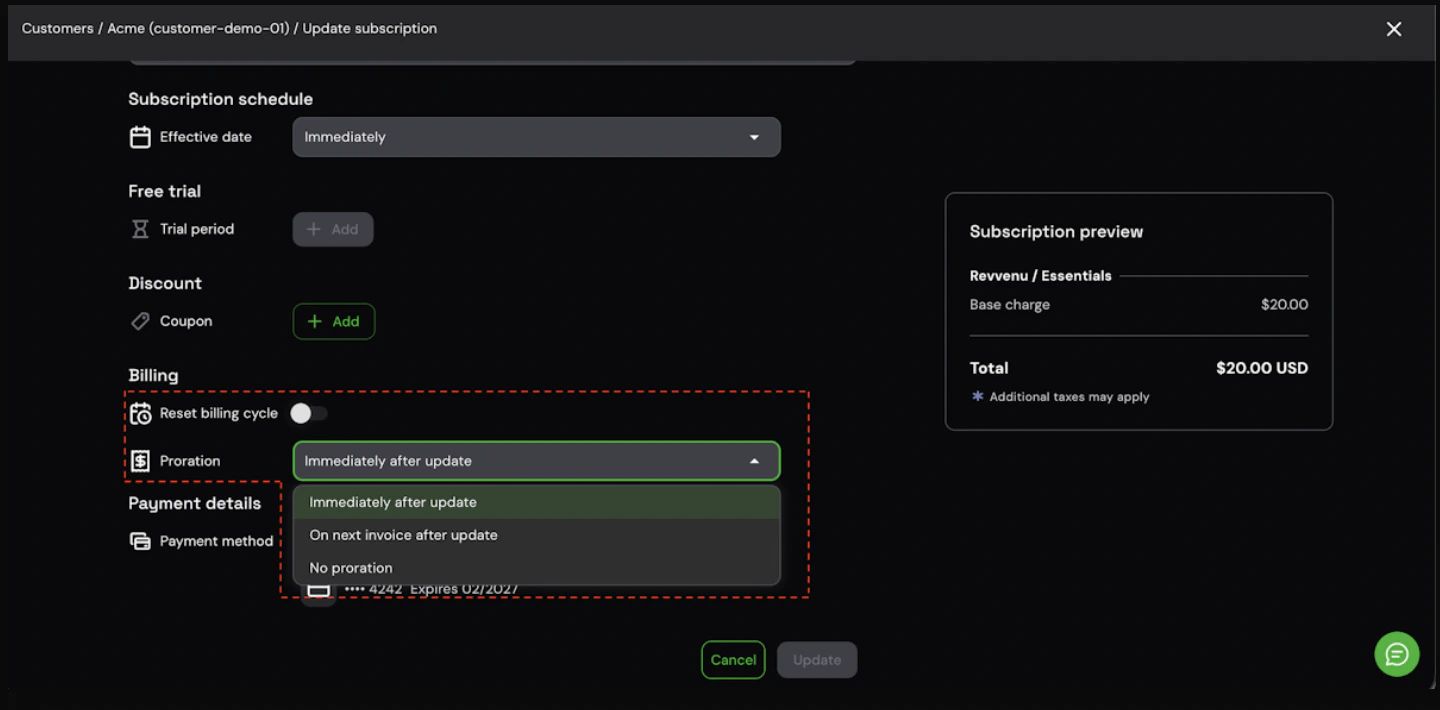
Billing anchor and proration controls in the subscription update dialog
Billing anchor and proration configuration is supported when Stigg is integrated with Stripe, Zuora, or a custom billing solution.
To reset the billing cycle anchor programmatically when provisioning or updating subscriptions via the SDK, pass the
billingCycleAnchor property with SubscriptionBillingCycleAnchor.UNCHANGED (default) or SubscriptionBillingCycleAnchor.NOW.